SSC GD Application Form 2027 : Apply Online, Direct Link @ssc.gov.in, Registration Last Date

SSC GD Form 2027: The Staff Selection Commission (SSC) will start the SSC GD Application Form 2027 process soon on the official website ssc.gov.in for recruitment to the posts of Constable (GD) in CAPFs and SSF, and Rifleman (GD) in Assam Rifles. Eligible candidates can submit the online application form through the SSC website before the last date.
Candidates should fill in all the required details, upload the necessary documents, pay the application fee, and submit the application form before the closing date.
SSC GD Application Form 2027 Overview
| SSC GD Form | Details |
|---|---|
| Exam Name | SSC GD Examiantion 2027 |
| Recruiting Authority | Staff Selection Commission (SSC) |
| Post Name | Constables (GD) in Central Armed Police Forces (CAPFs), NIA, SSF and Rifleman (GD) in Assam Rifles Examination, 2027 |
| Application Mode | Online |
| Application Process | Expected Soon |
| Official Website | ssc.gov.in |
SSC GD Form Dates 2027
The Staff Selection Commission has provided the application schedule in the official recruitment notice. Candidates can check the important dates below.
| Event | Date |
|---|---|
| Online Form Fill Up Starting Date | Expected Soon |
| Application Last Date | Expected Soon |
| Last Date for Online fee Payment | Expected Soon |
| Application Correction Window | Expected Soon |
SSC GD Application Form Fee 2027
The application fee for SSC GD is ₹100. Women candidates and candidates belonging to SC, ST and Ex-Servicemen (ESM) categories who are eligible for reservation are exempted from paying the application fee.
| Category | Application Fee |
|---|---|
| General / OBC / EWS | ₹100/- |
| Women Candidates | No Fee |
| SC / ST | No Fee |
| Ex-Servicemen (ESM) | No Fee |
The fee can be paid online through BHIM UPI, Net Banking, Visa, Master, Maestro or RuPay Debit Card.
How to Fill SSC GD Application Form 2027
Follow the process to apply online for SSC GD Constable and Rifleman GD application:
- Visit the official website ssc.gov.in.
- Complete the One-Time Registration (OTR) process if you are a new user.
- Login using your Registration Number and Password.
- Open the SSC GD examination application link under the Live Examination section.
- Fill in the required educational and other application details.
- Check the information filled from your OTR profile.
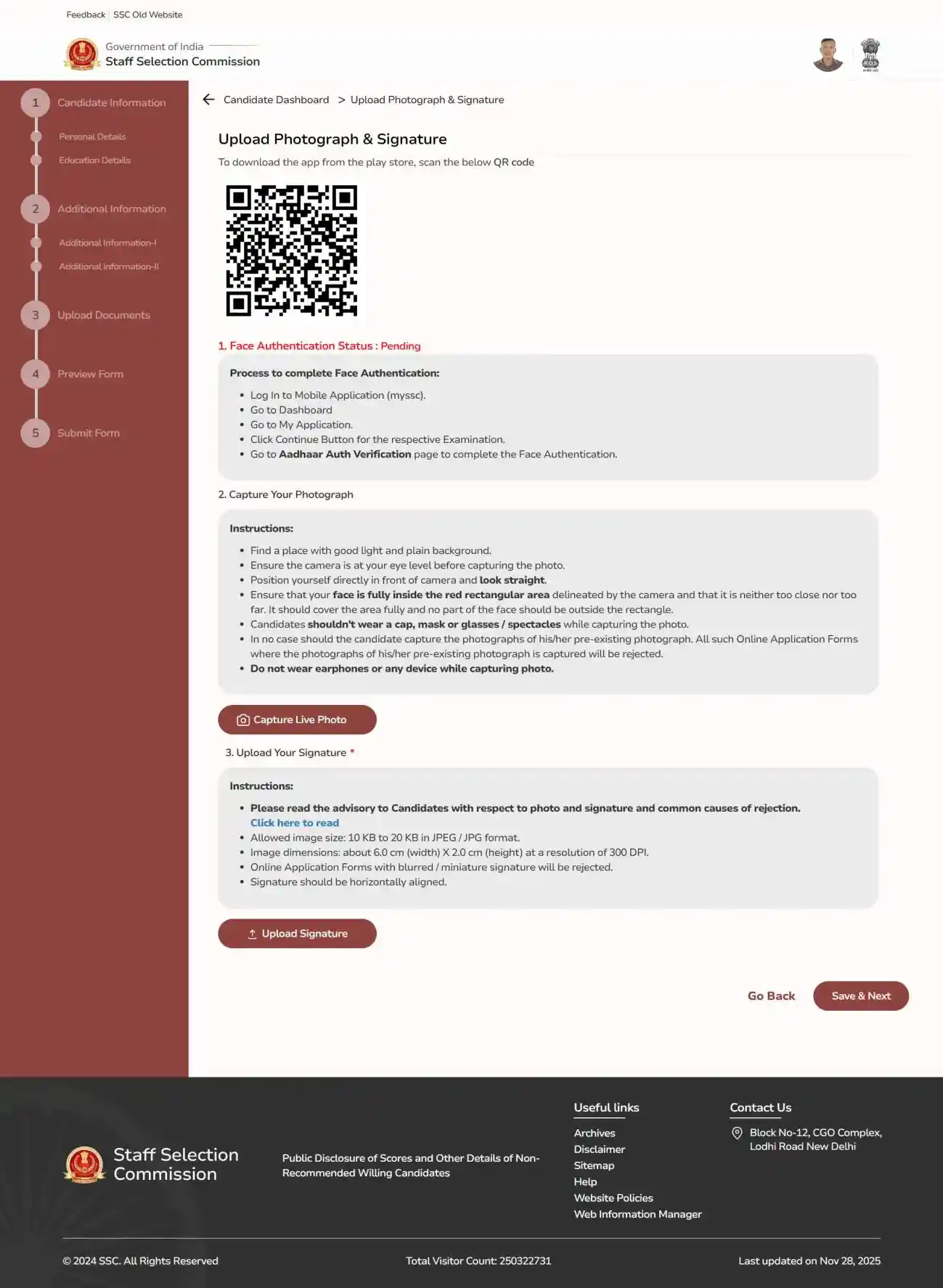
- Capture the live photograph as per the instructions.
- Upload the scanned signature in the required format.
- Enter the required examination and other details.
- Preview the application form carefully.
- Pay the application fee, if applicable.
- Submit the application form.
- Download and keep a copy of the submitted application form for future reference.
Step-by-Step Guide to Apply Online for SSC GD Constable 2027 using OTR
Step 1: Account Login/Registration
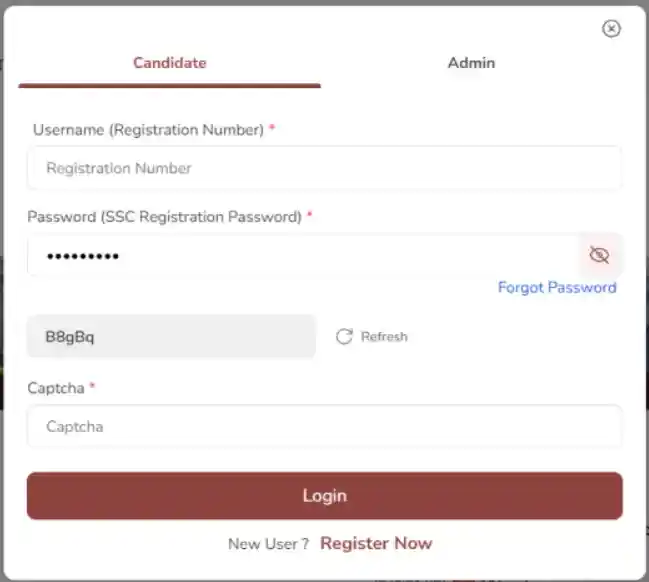
Visit ssc.gov.in and log in as a new or existing user.
Step 2: OTR Process Overview
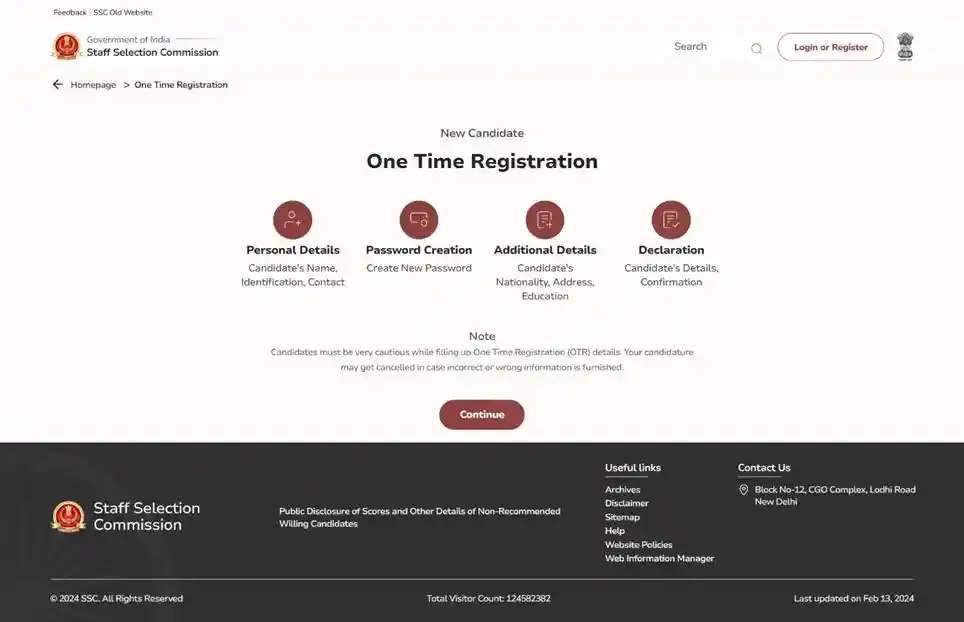
Understand the 4-step One Time Registration (OTR) process.
Step 3: Personal Details Entry
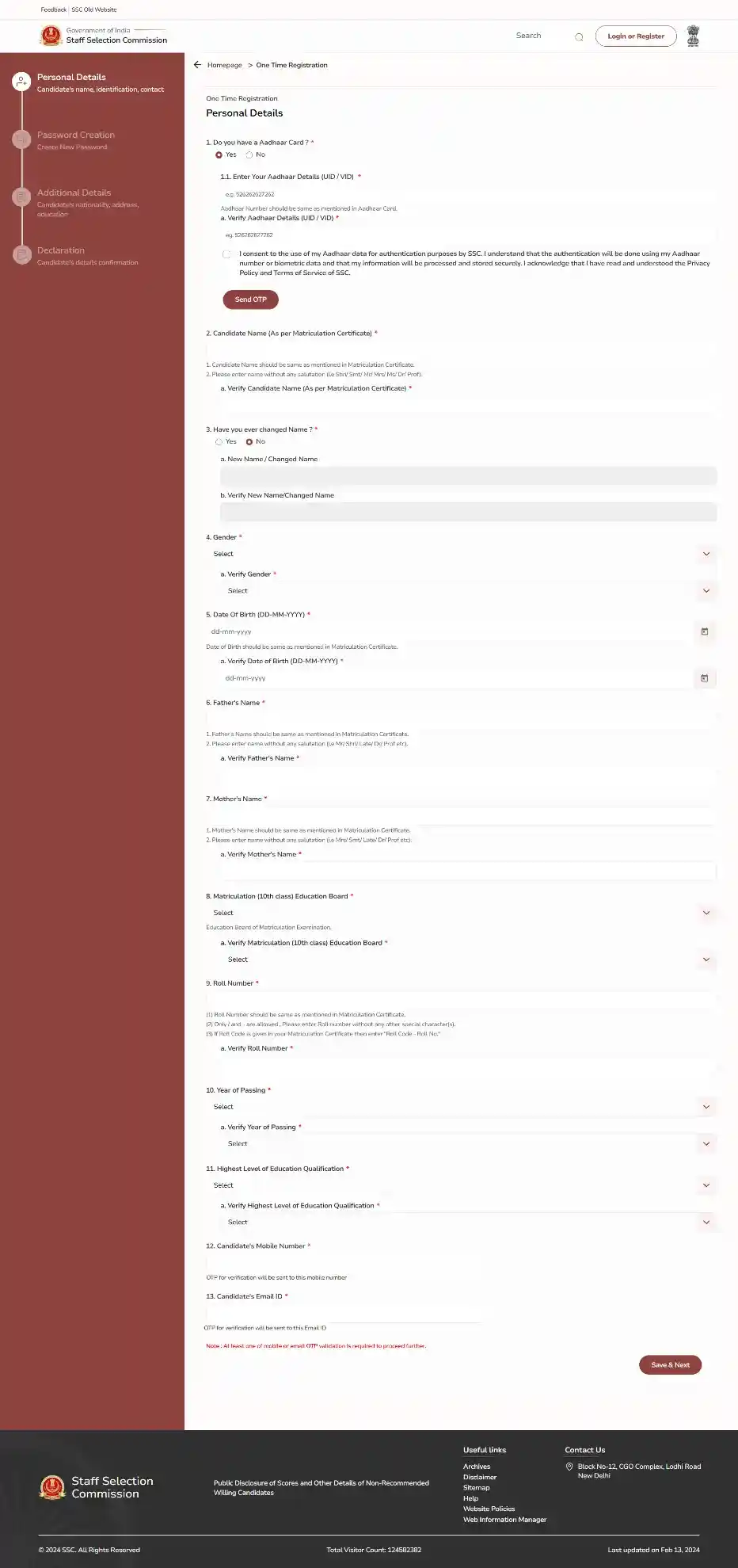
Fill in Aadhaar, name, DOB, and education details.
Step 4: Document Upload
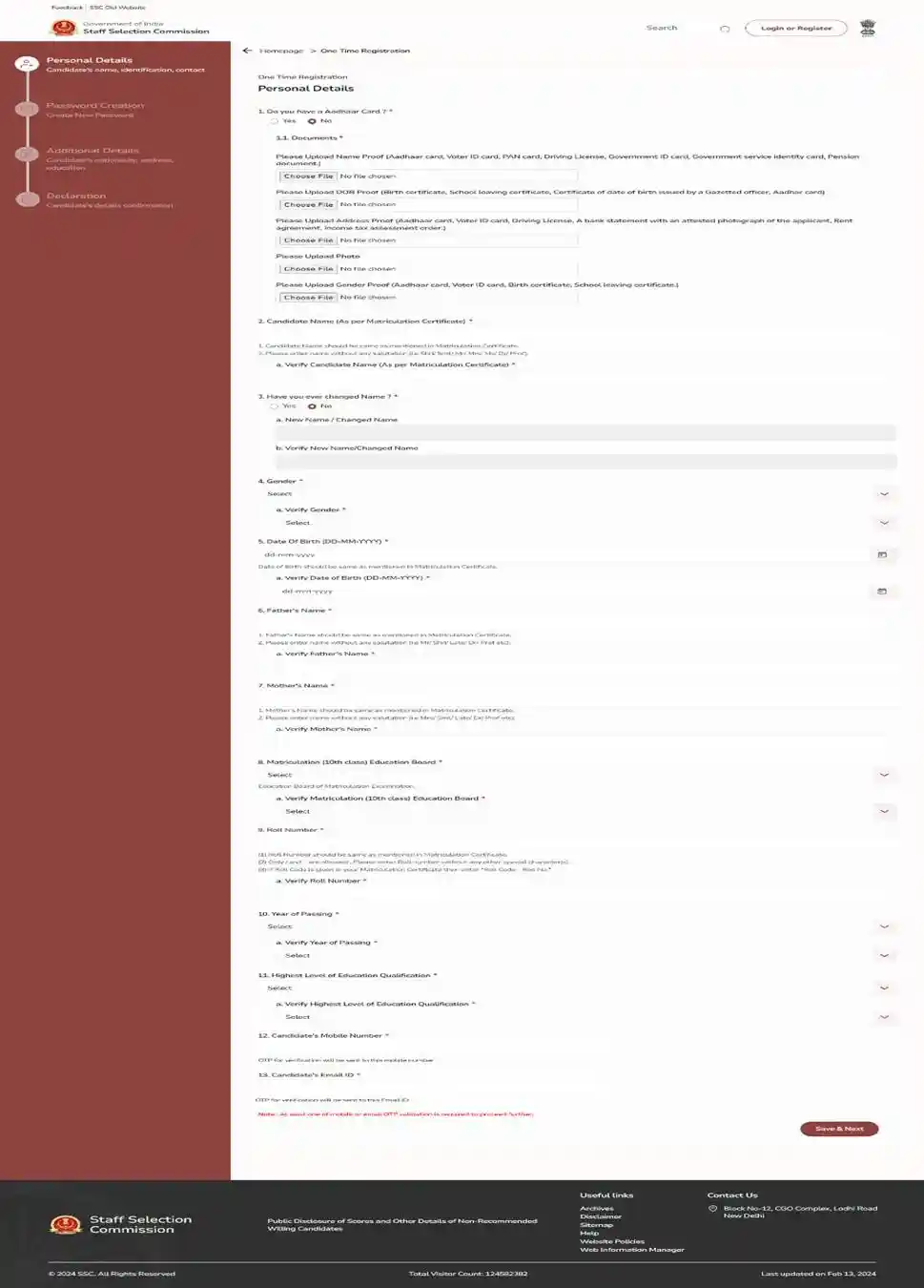
Upload required proofs for identity, DOB, and address.
Step 5: Registration Number Generated
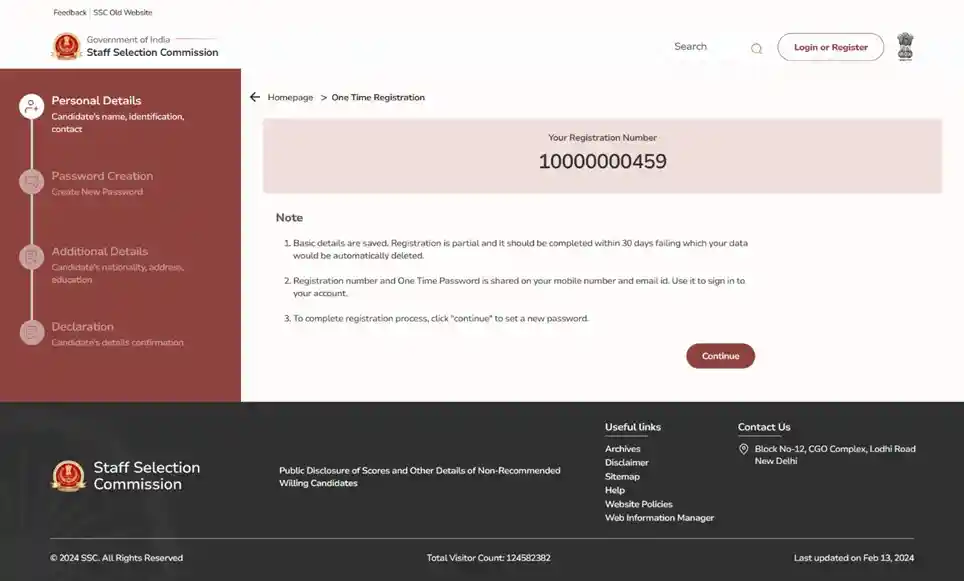
Note down your unique registration number for future use.
Step 6: Password Creation
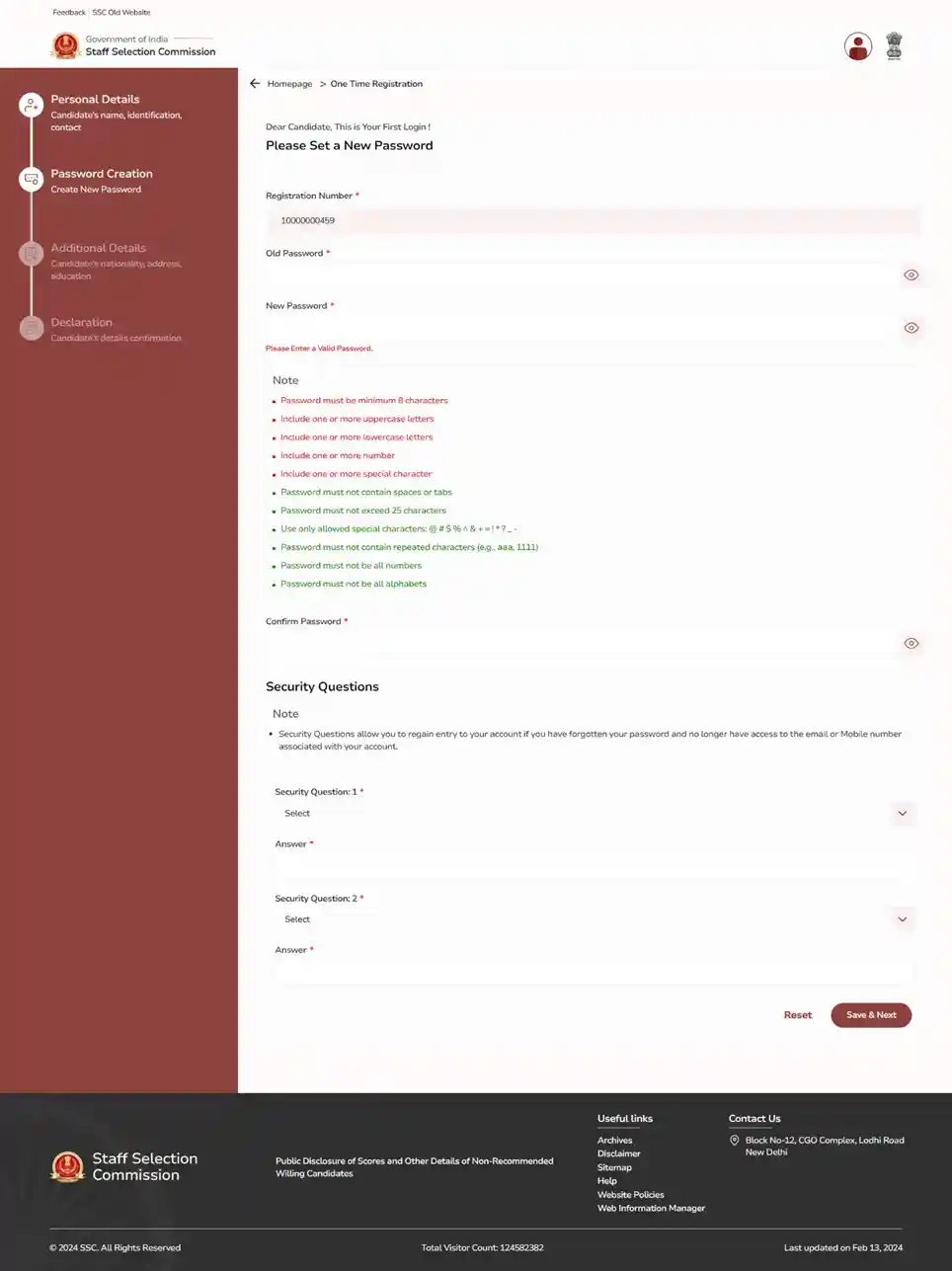
Set a strong password and choose security questions.
Step 7: Additional Details (OTR)
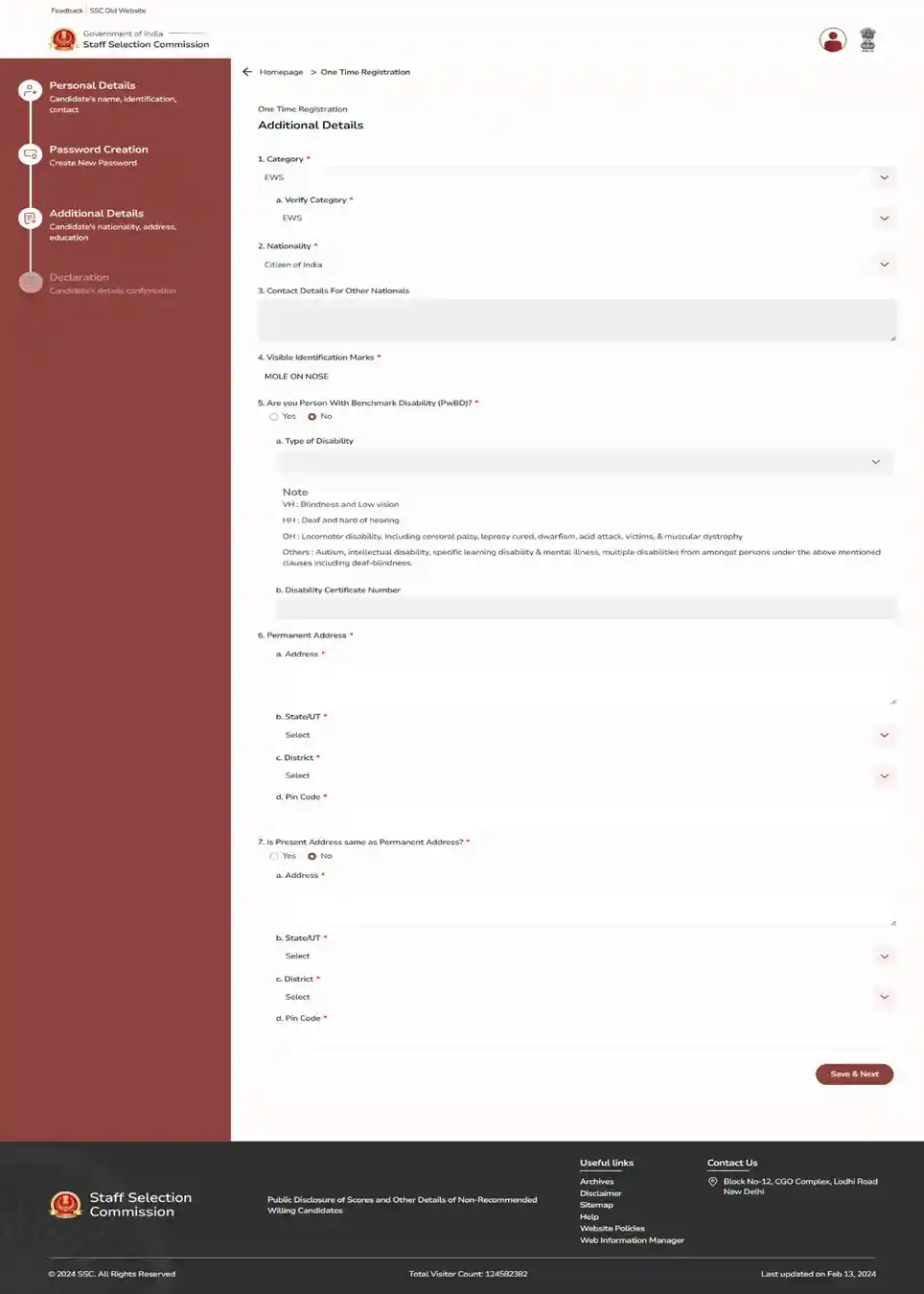
Provide category, nationality, and address information.
Step 8: Declaration & Submit OTR
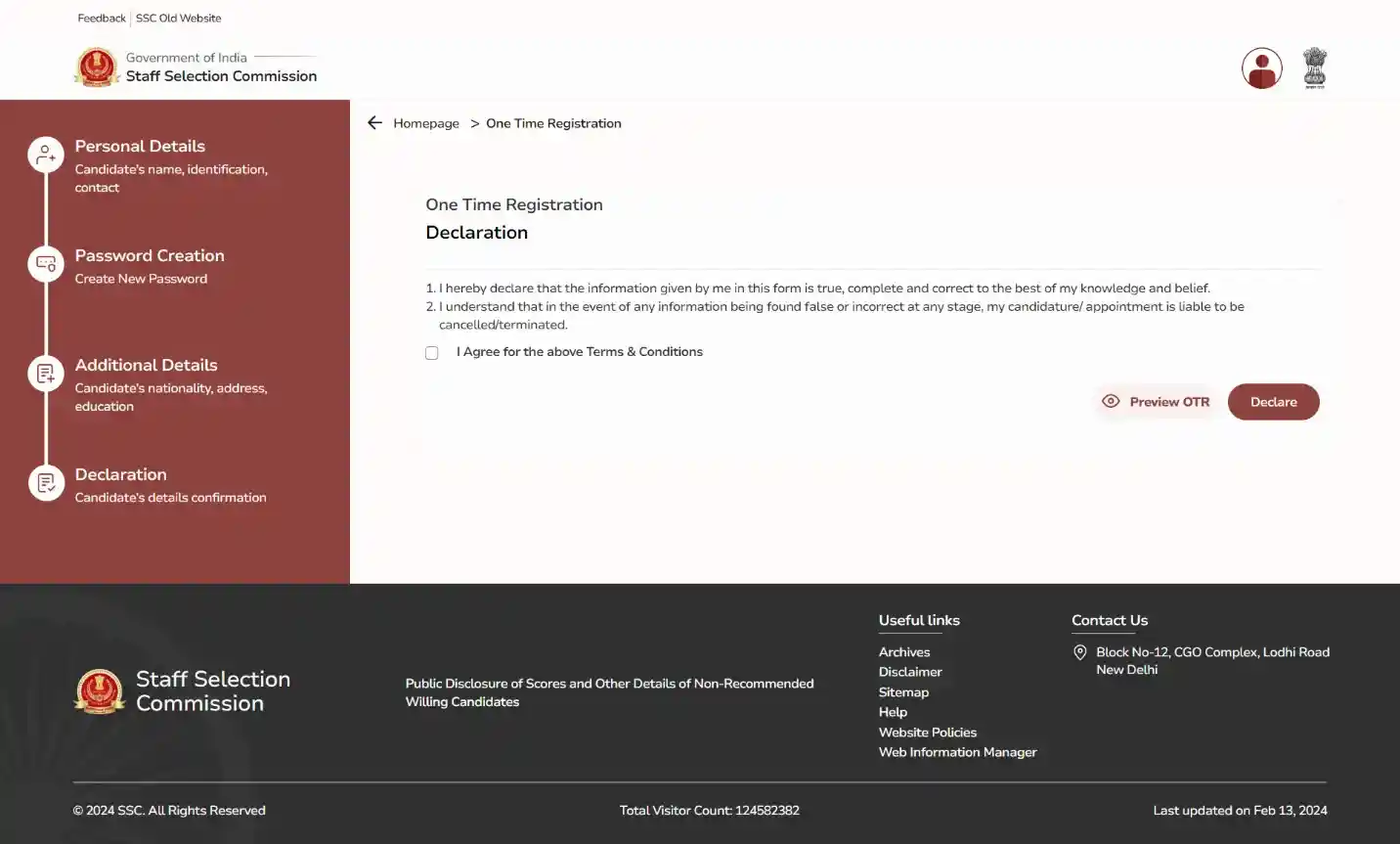
Agree to terms and submit your One Time Registration.
Step 9: Exam Instructions
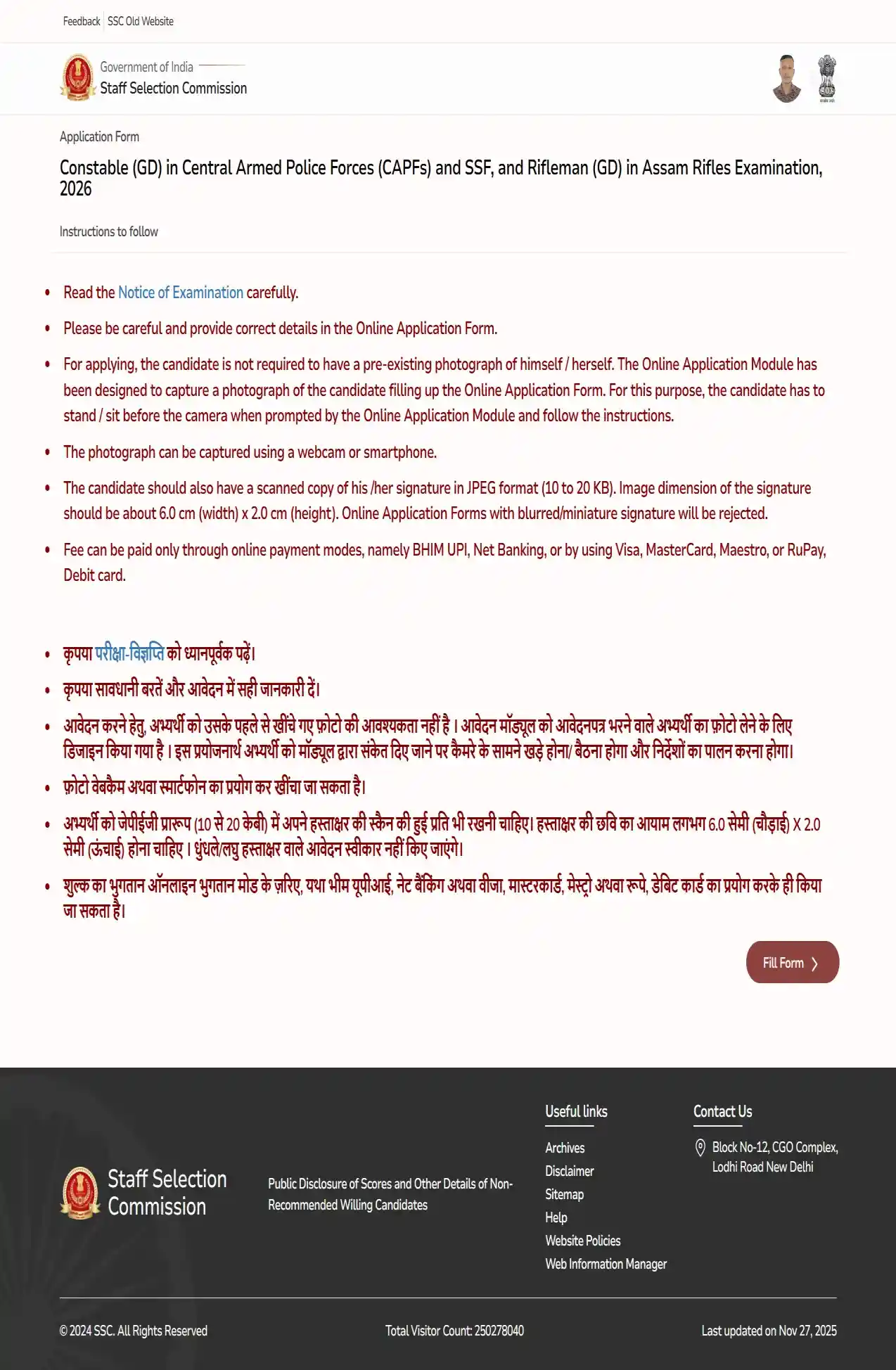
Read rules for photograph, signature, and fee payment.
Step 10: Auto-Filled Personal Details
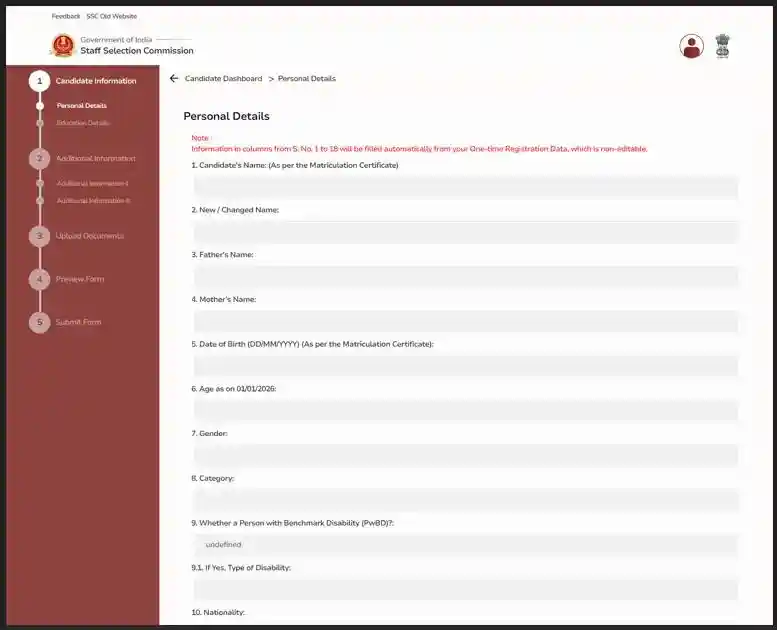
Verify auto-populated personal information from OTR.
Step 11: Auto-Filled Education & Address

Check auto-filled education and address details.
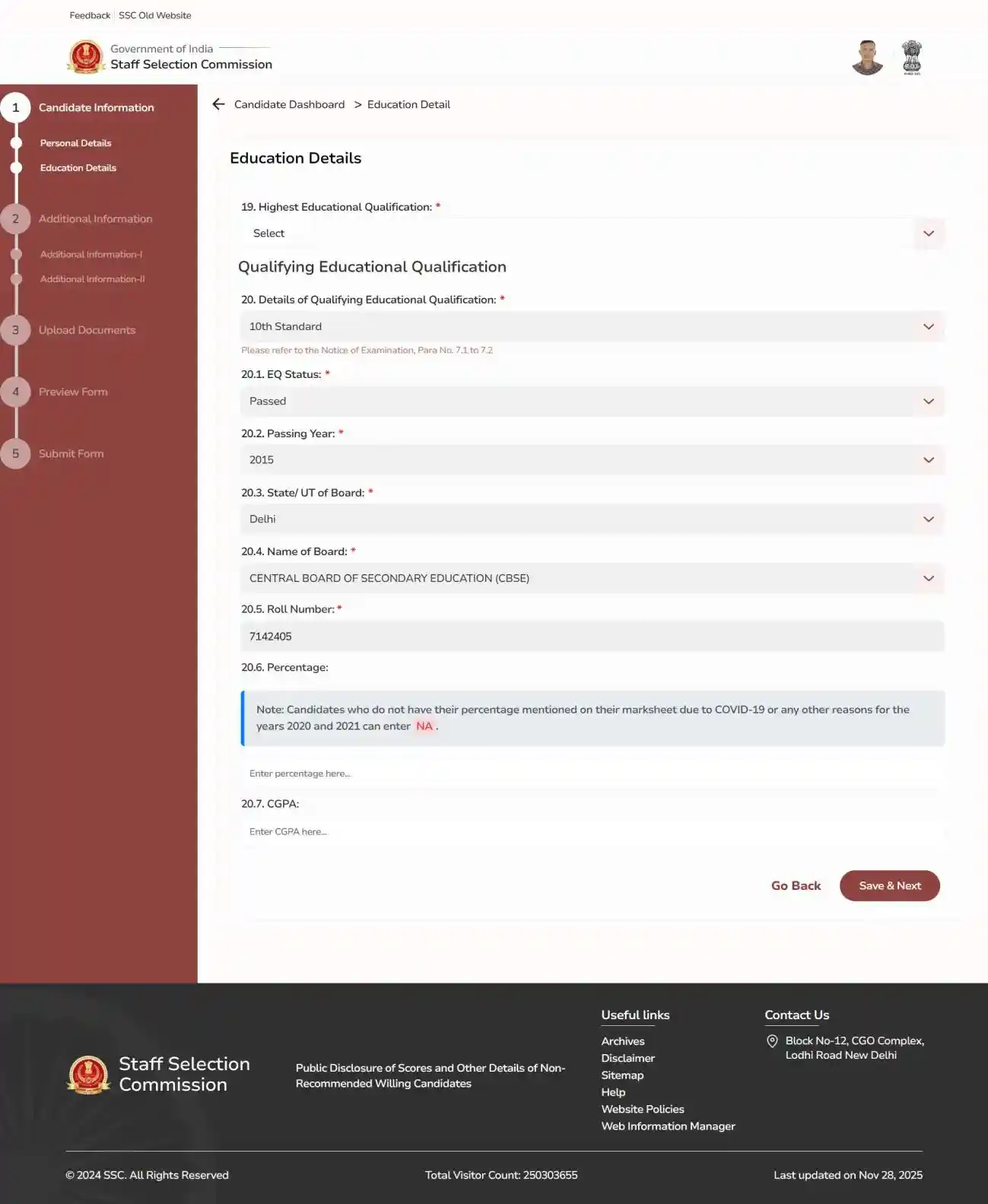
Step 12: Education Details Entry

Enter your highest qualification and exam specifics.
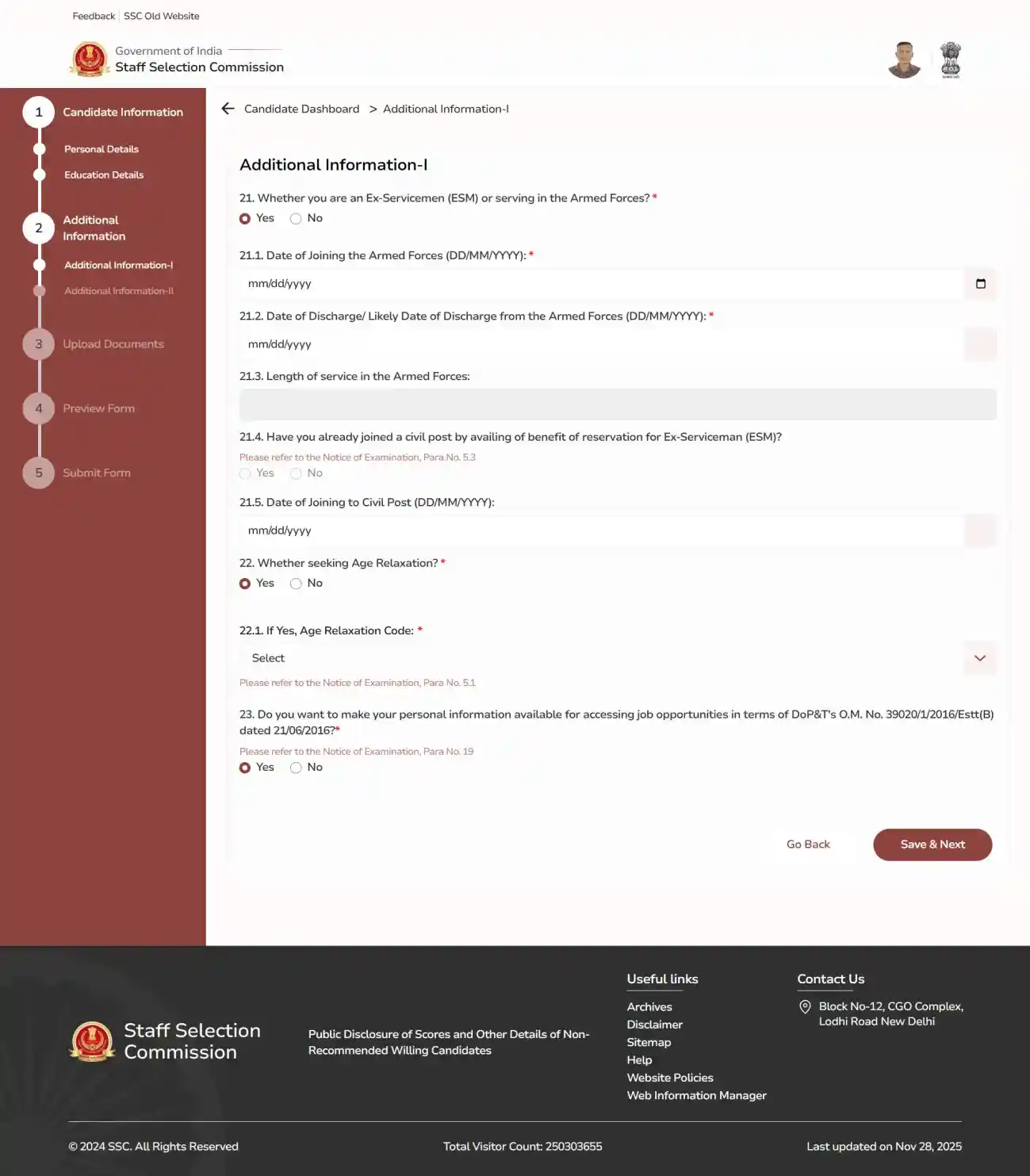
Step 13: Additional Information-I
Provide Ex-serviceman status and age relaxation details.
Step 14: Additional Information-II
Select exam center, medium, NCC, and sports details.
Step 15: Domicile & Reservation
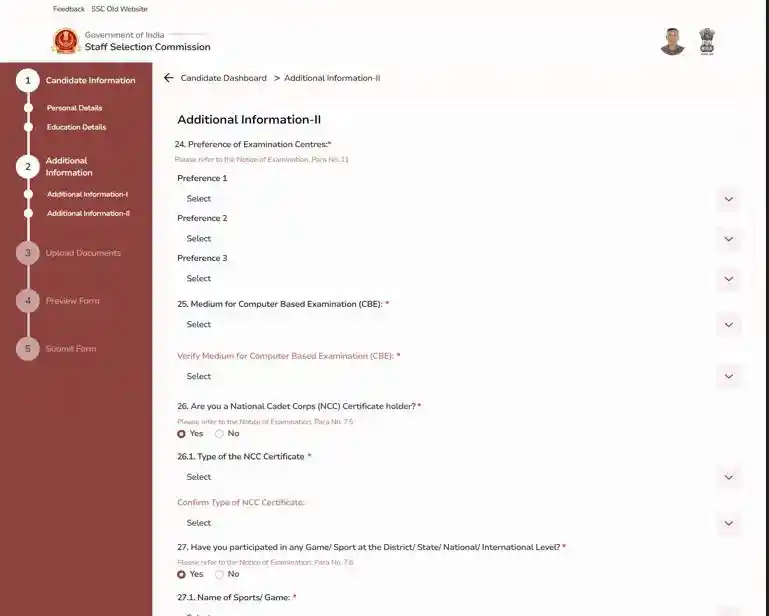
Choose your State/UT and reservation category benefits.
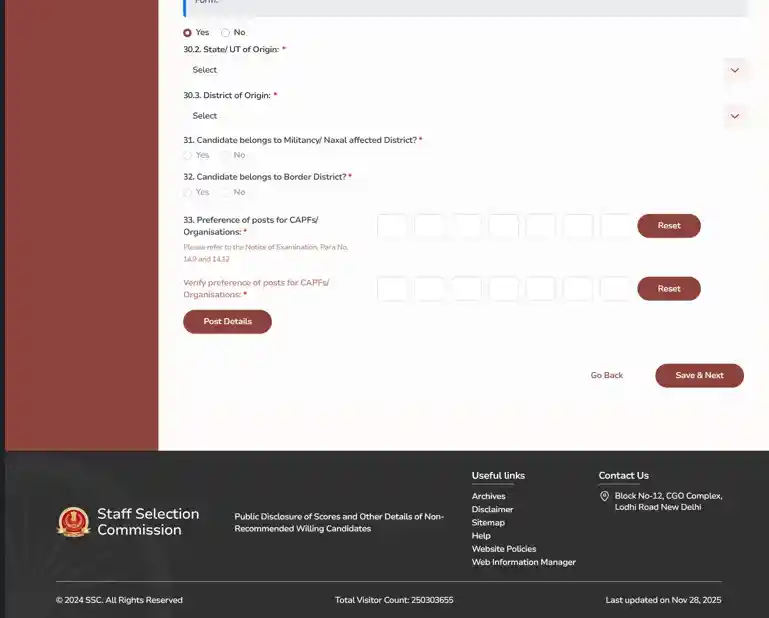
Step 16: Preferences & Post Details

Select preferences for CAPF organizations and posts.
Step 17: Photo & Signature Upload
Complete live photo capture and signature upload.
Step 18: Fee Payment
Pay the required application fee online via BHIM, UPI, Net Banking, or Card.
Step 19: Preview & Submit Form
Preview the application carefully, submit the form, and download a copy for future reference.
Documents Required For SSC GD Application Form 2027
Keep the following details and documents ready before filling the application form:
- Aadhaar Card / Valid Identity Details
- Matriculation / Class 10 Certificate Details
- Educational Qualification Details
- Domicile Certificate / PRC
- Category Certificate, if applicable
- EWS Certificate, if applicable
- Ex-Servicemen Details, if applicable
- Scanned Signature
- Valid Mobile Number
- Email ID
- Other required details mentioned in the application form
The application module captures the candidate’s photograph in real time. The photograph should have a clear full-frontal view, with good lighting and a plain background. Candidates should not wear a cap, mask or glasses while capturing the photograph. The scanned signature should be in JPEG format, 10 to 20 KB, with dimensions of about 6.0 cm × 2.0 cm.
SSC GD Application Form Correction Window 2027
The SSC GD Application Form Correction Window 2027 is for candidates who need to change details in their submitted registration. The correction facility is available for a limited period after the registration process ends. Candidates should use this time to check their details and make any allowed changes carefully.
Correction Window Dates
The correction window scheduled available after form deadline. Candidates should complete any required changes within this period because SSC does not accept correction requests after the window closes.
| Event | Date |
|---|---|
| Correction Starts | Expected Soon |
| Correction Ends | Expected Soon |
Correction Fee
SSC charges a correction fee when a candidate changes and resubmits the form.
- First correction: ₹200
- Second correction: ₹500
The charges apply to candidates irrespective of their category. A candidate can make corrections and resubmit the form up to two times during the correction window.
Important Points
- Check every changed detail before resubmitting the form.
- The latest corrected form is treated as the valid form.
- Keep a copy of the corrected form after submission.
- Complete the correction and payment within the given dates.
- No further changes are allowed after the correction window closes.
How to Confirm SSC GD Application Form is Submitted
After completing the SSC GD Registration 2027, candidates should confirm that the form has been submitted successfully. The registration number and submitted form are important for future activities related to the recruitment.
Details to Save After Submission
- Registration Number: Keep it safe because it is used to log in and access recruitment-related services.
- Submitted Form: Download and save the final form for future reference.
- Payment Receipt: Keep the payment confirmation if a fee was paid.
Check Application Status
SSC provides application status information through its regional websites. Candidates can use their login details to check whether their form has been accepted and whether they can proceed to the next stage.
Application Status
- Accepted: The application has been accepted by SSC.
- Rejected: The application has not been accepted. Candidates should check the reason shown by SSC.
- Incomplete: The form or payment has not been completed properly.
If the application fee is not received by SSC, the application can be shown as incomplete and may be rejected. SSC advises candidates to check their payment status after making the payment.
Common Mistakes to Avoid in SSC GD Application Form 2027
Small errors in the registration can create problems later. Candidates should check the following points before submitting the form:
1. Check Personal Details
Enter your name, date of birth and other personal details carefully. Check these details against your Class 10 certificate before submission.
2. Check the Uploaded Documents
Make sure the photograph, signature and other required documents are clear and follow the instructions given by SSC. Do not upload files that are unclear or in the wrong format.
3. Do Not Wait Until the Last Day
Complete the registration before the deadline instead of waiting for the final day. This gives you time to fix any problem with the form or payment.
4. Check the Payment Status
After paying the application fee, check whether the payment has been received successfully. An unsuccessful payment can leave the application incomplete.
5. Select Details Carefully
Check your category, educational details and other selections before submitting the form. Do not assume that every field can be changed later.
6. Review the Complete Form
Read the complete form once before final submission. Check spelling, numbers, uploaded files and other information.
7. Save the Final Form
Download the submitted form and payment receipt after completing the registration. Keep these records safely for future use.
Important Points While Filling the SSC GD Form 2027
- Save or download a copy of the final submitted application form for future reference.Candidates should submit the application form well before the closing date to avoid problems caused by heavy website traffic or login issues.
- Check all personal and educational information before submitting the form.
- Enter the date of birth exactly as mentioned in the required documents.
- Upload a clear signature in the prescribed format and size.
- Follow the instructions given for capturing and uploading the live photograph.
- Review the complete application form carefully before final submission.
- Complete the application fee payment, if applicable.
- Submit the form before the application deadline to avoid last-minute issues.
Conclusion
The SSC GD Registration 2027 will available online through ssc.gov.in. Candidates should complete the registration before the last date and check all entered details carefully before final submission. After completing the process, candidates should download and keep a copy of the submitted form and fee payment receipt for future reference.